01
The alert is born on your computer.
Signals aren’t relayed to you from a server. Binance prices stream straight to your computer; your conditions are calculated there within milliseconds, and the alert fires there.
A rule-based signal and trading bot. Build any signal you want, without entering an API key; the moment your conditions are met, the alert comes in.
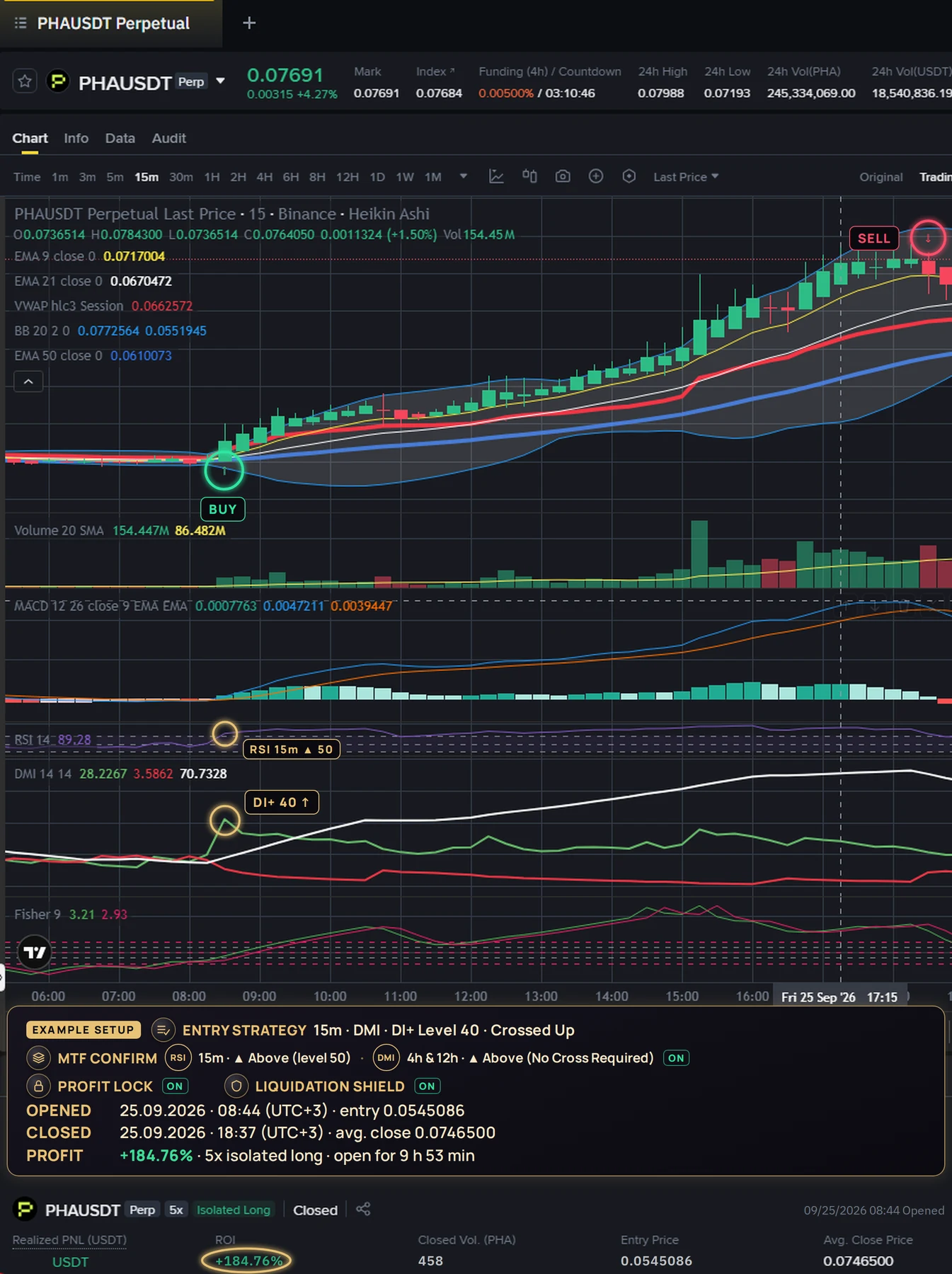
Signals aren’t relayed to you from a server. Binance prices stream straight to your computer; your conditions are calculated there within milliseconds, and the alert fires there.
Without entering an API key you set up Entry Strategy conditions, MTF Confirmation and the BTC Gate; the moment your conditions are met, the alert comes in. The indicators and modules you can use depend on your package.
If you enter an API key, it stays encrypted on your computer only. Orders are signed and go straight to Binance; there’s no server of ours in between.
Around the strategy you build, the bot does all this too. Every item was taken from the bot’s own code.
A Futures position you open in the Binance app or on your phone shows up in the bot’s list within seconds. With one click in the Modules menu, Profit Lock, Liquidation Shield and DCA Rescue manage it too.
It also sees positions you close manually right away: they drop off the list and any stops left on that side are cleared. It won’t touch a coin you hold long-term unless you select it.
When the program opens, your open positions and stops on Binance come into the list. In the startup window, you choose coin by coin which protection applies to which one.
Add an Extra Page to the main page and go up to 11 pages. Each page has its own market, timeframe, strategy, coins, budget and protection; each one starts and stops on its own. All alerts show up on a single radar.
Click the page badge (A, 1, 2…) on the left of the position row and pick the target page. The position stays open and no order goes to the exchange; from then on it’s managed by the target page’s DCA, Liquidation Shield and Profit Lock settings.
Under the Heikin Ashi candles, EMA 9/21/50, VWAP, Volume, MACD, RSI, DMI and Fisher are ready; you don’t set up any of them yourself. Where the bot bought is marked on the chart with a “U”, and stop and liquidation levels appear as lines.
All coins are watched at the same time. When a coin passes all your rules, its disc lights up on the radar and stays on screen with a 15-second countdown: you see at a glance which coin triggered the alert. LONG is green, SHORT is red.
For each of the 12 timeframes, 300 candles of history are loaded per coin. Each timeframe shows as ENTRY, CONFIRMATION, READY or UNUSED; no signal is generated from a timeframe that hasn’t finished loading, and no decision is made on incomplete data.
Got a coin with bad memories? Put it on the Blacklist; the bot never scans it again, not even for an alert. 10 stablecoins like USDT, USDC, DAI and FDUSD are never scanned in the first place.
Save all your settings under a name, restore them with one click, delete the ones you don’t like. Loading a profile doesn’t start the bot: you check first, then you start it.
Press CALCULATE to see whether BTC meets your rules right now. If the gate closes during a scan, a red bar appears and the BTC icon blinks: no new buys until BTC allows it.
Even with $10,000 in your wallet, if you enter $1,000 in Max. Total Margin, the bot never exceeds $1,000, including new buys, DCA and Liquidation Shield. It doesn’t touch your remaining $9,000.
No API key needed: a 10,000 USDT virtual balance with live Binance prices and a real buy-sell flow, fees included. No orders go to the exchange. The demo runs on Futures.
Draws your trade’s result on a shareable card: only the percentage shows, your dollar amount stays hidden. The logo, your referral link and your QR code go on the card; share it on X or Telegram, or download it as a PNG.
Trade, protection and critical alert messages come from your own Telegram bot. During quiet hours (default 00:00–08:00) only critical alerts come through; the daily summary is your choice, and dollar amounts are hidden by default.
Nine separate sounds for signal, buy, profit, loss, Profit Lock, DCA, shield, warning and disconnection; turn off the ones you don’t want one by one. Listen to the sounds
It sets Hedge Mode, Single-Asset Mode and isolated margin by itself while no position is open, and sets the per-coin leverage itself on every buy. No getting lost in Binance’s settings menus.
There’s more below: 53 more features inside the bot.
UMRAYS runs on your own computer, not a server. Alerts are produced on your machine; you never wait for a server to pass them on.
With a single indicator (DMI: DI+ crosses above 50), a coin’s new price is calculated in a median 0.065 milliseconds. Even with the seven Entry Strategy indicators and all their conditions, the 12 timeframes of MTF Confirmation and the ten BTC Gate rules switched on at once, it takes 1.1 ms. In the heaviest measurement, where we had every rule calculated one by one with no shortcut at all, the median is 4.4 ms.
Binance pushes the new price straight to your computer over WebSocket. The bot doesn’t ask, it listens.
Live feedIndicators, entry rules, MTF Confirmation and BTC Gate; all on your computer.
0.065 – 1.1 msSigned and sent straight to Binance; there’s no server of ours in between.
Signing 0.002 ms · the rest is the internetIn real use, while watching 527 coins at once, the bot processes an average of 345 price updates per second; most of the time 2 updates are waiting in the queue. Stops and Profit Lock orders are orders waiting on Binance: Binance triggers them the instant the price touches.
Measurement: the bot’s own calculation code, median of 600 runs on a 2-core test computer (1 October 2026); on your computer the time depends on your CPU. An order reaching Binance and its confirmation coming back depends on your internet connection.
Your Binance API keys are never sent to us or any middleman; they stay encrypted on your computer only.
Build any signal combination and receive the signal without a key. Signals are calculated from Binance data; you place the trade by hand on Binance or any other exchange, no Binance account needed. Without a key these don’t run: auto buy/sell, DCA Recovery, Profit Lock and Liquidation Shield. Choose demo mode and all of them run without a key, on a $10,000 virtual balance.
The bot runs while your computer is on and stops when you close it. You stay in control.
You switch on and tune every layer. The bot only trades by the rules you set; it offers no ready-made strategy or template.
7 indicators, 64 conditions and 20 setting boxes: EMA, MACD, RSI, ADX/DMI, Fisher, VWAP and Volume. You pick and combine every condition yourself; the bot suggests no ready-made strategy. The Condition Window filters out false crosses.
A lower-timeframe signal becomes a trade only after higher timeframes confirm it. 6 indicators, 12 timeframes, 37 rules.
Trades or halts based on BTC’s overall state. 7 rules, 12 timeframes and AND logic: if one criterion fails, nothing passes.
Never adds blindly to a losing position. The trigger is your entry strategy signalling again, in the same direction, on that coin. Then five checks run; only if all pass does it add, pulling the average cost toward the price. It doesn’t erase the loss; it shortens the way back.
Moves a winning position’s stop upward; the stop never comes back down. You choose one of two modes; they never run together on the same coin.
Adds margin when price nears liquidation and pulls the excess back when it turns your way. It watches price distance only.
UMRAYS computes its indicators on Heikin Ashi candles, not regular ones. Heikin Ashi averages each candle with the one before: less noise, clearer trend. That’s why the RSI, MACD or EMA you see on a regular chart differs from the bot’s. Set up your chart as below to see the same values.
Open the same chart in the live botNo setup needed: the bot at the top of this page shows real Binance data with the bot’s own settings and colors.
| Indicator | Inputs | Color |
|---|---|---|
| EMA 9 | Length 9 · source close | #FFEB3B |
| EMA 21 | Length 21 · source close | #FFFFFF |
| EMA 50 | Length 50 · source close | #2196F3 |
| MACD | 12 · 26 · 9 · source close · EMA / EMA | MACD #2196F3Signal #FF9800 |
| RSI | Length 14 | #BA68C8 |
| DMI · ADX | ADX smoothing 14 · DI length 14 | ADX #FFFFFF+DI #26A69A−DI #EF5350 |
| Fisher Transform | Length 9 | Fisher #22D3EETrigger #EC4899 |
| VWAP | Source hlc3 · Session | #FF9800 |
| Volume | MA 20 · SMA | MA #FF9800 |
| Candles | Heikin Ashi | Up #26A69ADown #EF5350 |
Max Open Positions is how many positions may be open at once. Set 3, and while 3 are open a fourth signal opens nothing; when one closes, the next one gets in.
Max Total Margin caps the total margin tied up in your open positions. Set $300, and no new entry opens if it would push the total past $300; DCA and Liquidation Shield additions can’t exceed it either. In both, 0 means “no limit”.
The blacklist keeps the coins you pick out of scanning entirely.
Keep withdrawals disabled on your API key. When creating the key on Binance, enable only reading and trading. UMRAYS never uses the withdrawal permission; with it off, no funds can be withdrawn with that key.
UMRAYS will never ask you for:
Choose demo mode and no API key is needed: every indicator, automated trading and all five modules run at live market prices on a $10,000 virtual balance. The money isn’t real and no order reaches the exchange. Demo runs on Futures.
No credit card, at any step: not to download, not in the 7-day free trial, not in demo mode. Payment details are asked only if you decide to buy a package, on the payment page.
Your card details are never stored with us, and there is no auto-charge.
The interface and every ? explanation come in 23 languages. Arabic, Persian and Urdu flip right-to-left.
While you have a plan, using the bot 2 hours a day earns you 0.25–1 APEX depending on your plan: up to 30 APEX a month.
10% in gift APEX on the first payment made by someone you invited, once per person; the only condition is that you have made a payment too. No automatic charges, no stored cards. The person you invite also gets 10% of their own first payment as gift APEX, once.
You hear what’s happening even when you’re not looking at the screen. All nine sounds were written in the key of the UMRAYS opening music; they play the same whatever language you use the bot in. Tap a card to listen.
In the bot, the speaker to the right of the FEED panel turns all sounds on and off; the arrow next to it opens this list inside the bot, where you mute the sounds you don’t want one by one. Every feed line that plays a sound has a ▶ next to it: replay any sound you missed from there.
53 features we had no room to cover in the intro. All of them work in the bot today.
The number of combinations you can build exceeds 10120. No ready-made strategies; you choose everything.
The strategy you build is written out in plain sentences: what you see on screen is what gets searched for.
Save your setup under a name and restore it with one click. The list shows each profile’s market and direction.
Up to 4 separate strategies in the same bot: each page has its own coins, timeframe, margin and protection.
Move a coin with an open position to another page; the target page’s quota and budget are checked by the bot.
Scan all coins or a single coin; you set the minimum volume.
Before you start scanning, it shows a summary of your strategy and your open positions in one window; it won’t start until you confirm.
One page can run Futures, another Spot; both are scanned at the same time.
Put a coin with bad memories on the Blacklist and the bot never looks at it again. 10 stablecoins like USDT, USDC, DAI and FDUSD are never scanned in the first place; BTC can’t be blacklisted, because the BTC Gate runs on its data.
Checks with one button whether BTC meets your rules right now. If the gate closes during a scan, a red bar appears and the BTC icon blinks; no new buys until BTC allows it.
No API key needed: live prices with a 10,000 USDT virtual balance, a real buy-sell flow and a 0.05% fee; no orders go to the exchange. The demo runs on Futures.
Instantly calculates leverage × trade amount × number of positions: “20× × $10 = $200 per trade · 5 positions = $1,000”. When there’s no room left, it lights up red and tells you why.
If the total of the trades you can open exceeds half your budget cap, it warns you the moment you type the number, so Liquidation Shield and DCA have room to add margin.
Even if you stop scanning, Profit Lock, DCA Rescue and Liquidation Shield keep running on your open positions.
Every stop the bot placed in one list; synced with Binance within 60 seconds at most, or refresh it instantly if you want.
You choose coin by coin which position is protected by which module. It doesn’t touch positions you didn’t select, such as a long-term hold.
Closes the position when net profit reaches the dollar amount you set; it also runs in parallel while Profit Lock is on.
Stop orders are tied to the mark price, not the last traded price; this lowers the risk of a single wick in low liquidity triggering your stop.
The bot doesn’t touch a stop-loss order you placed manually on Binance, and doesn’t take it over.
CLOSE for a single position, CLOSE ALL for all of them. Closing all asks for confirmation and goes through a 10-second lock.
When reopened, it recognizes your open positions and your stops on Binance, and keeps managing them.
When a position closes, the remaining stop orders for that position are cleared; the other direction of the same coin isn’t touched.
Never opens a second position in the same coin and direction; it checks against your live Binance account data, and signals arriving from several timeframes at once become a single buy.
A Futures position you open in the Binance app or on your phone shows up in the list within seconds; put it under protection with one click in the Modules menu. It also sees positions you close manually and clears the stops left on that side.
Even with $10,000 in your wallet, if you enter $1,000 in Max. Total Margin, the bot won’t exceed $1,000, including new buys, DCA and Liquidation Shield.
The 7 indicators and 64 conditions, MTF Confirmation and BTC Gate work exactly the same on the Spot page; the strategy you build scans Spot coins and buys on its own.
L1–L3 profit levels and Candle Trail work on Spot too; the protective stop sits on Binance as a pending sell order.
Adds to a coin in the ledger when the strategy signals again; once per candle, with a cooldown, minimum loss, maximum adds and a budget limit.
When the target profit is reached, it places a limit sell order on Binance.
Hand the coins in your wallet over to the bot: cost is calculated automatically from your Binance trade history.
On Spot, the bot never places a sell order below your buy cost; it doesn’t touch coins you haven’t ticked.
Coins the bot bought sit in a separate table with their cost; the SELL button also refuses to sell below cost.
If you sell on Binance yourself, the bot updates its ledger; once the coin is fully sold, it clears the remaining orders for it.
Leverage, short and Liquidation Shield aren’t Spot concepts: on Spot the bot only buys and sells what you own.
The bot’s own chart: search and pick a coin, switch between 12 timeframes. 8 indicator panels under Heikin Ashi candles, price readout at the cursor and time left until the candle closes.
Profit percentage for today, this week and this month; number of trades, win rate, best trade and a chart of the last 10 trades.
See at a glance which of the 12 timeframes is at entry, in confirmation or standing by; RAM, CPU and network usage are live too.
Nine separate sounds for profit, loss, signal, buy, stop, DCA, shield, alert and connection; you can listen to all of them above.
How many clicks your invite link got, how many people signed up and the APEX you’ve earned show live in the bot.
Trade, protection and critical alert notifications from your own Telegram bot; daily summary and quiet hours are your choice.
Entry and exit price, duration, DCA count and Profit Lock level of every trade on a single line.
Profit percentage is calculated on the initial margin; it reads the same as on the Binance screen.
Draws the result of a trade or of the last 30 days on a shareable card: only the percentage shows, never the dollar amount; a disclaimer is printed under the card.
Every step the bot takes streams to the screen in clear sentences in your chosen language; filter by buy, liquidation, stop, DCA and profit.
When a coin passes all your rules, its disc lights up on the radar and stays on screen with a 15-second countdown; LONG green, SHORT red.
The Support tab shows your Binance connection, key permissions and the last critical error; you open a support ticket from inside the bot.
The Launcher checks your key with Binance before starting; if there’s a permission or IP problem, it shows the fix.
Sets Hedge, single-asset and isolated margin itself when there are no open positions.
Your API key is encrypted specifically for your computer; if the file is copied to another machine, it won’t open.
Syncs with Binance’s clock at startup and every 5 minutes.
If the connection drops for a moment, it fills in the missed candle close from Binance; indicators don’t drift.
At startup it first downloads past candles; it produces no signals until the data is complete.
Watches Binance’s request and order limits; if a temporary ban hits, it waits until it expires.
We went through the official documentation of 10 crypto bot services one by one. If a feature isn’t in the docs, we counted it as “no”. No company names; just how many have it.
The comparison is based on the official help and pricing pages of 10 crypto bot services as of September 2026; the last three rows were added from the same sources on 1 October 2026. Rows marked “/ 3” count only the 3 services that run on your computer.